Heinzel Pro is to admins what AI agents like Claude Code are to programmers.
Updates, certificates, user accounts: Heinzel Pro handles the routine on your Linux, BSD and macOS servers, in the tradition of the Heinzelmännchen, at 3 a.m. too. And when everything is on fire, it stays calm, finds the cause and fixes it. How much it may do on its own you set per server and session: put each step up for approval, or do it all itself. Your team only describes the job, and every command is in the audit log. The rules behind it come from Heinzel (see also the
heise.de article on Heinzel, in German).
Heinzel Pro knows Debian, Ubuntu, Linux Mint, RHEL, CentOS, Fedora, Rocky, Alma, openSUSE, SLES, NixOS, FreeBSD, NetBSD, OpenBSD, macOS and Unraid. We add other Linux and Unix-like systems free of charge when you need them.
Move the sliders to your own figures. We use the cheapest plan for your servers, in the cloud and paid by the year.
Saved in a year
€14,610
Admin hours saved
208 hours
What those hours cost
€15,600
Heinzel Pro Solo, a year
−€990
An example with your own assumptions, not a promise. Prices plus VAT.
Keep full control
You set the rights
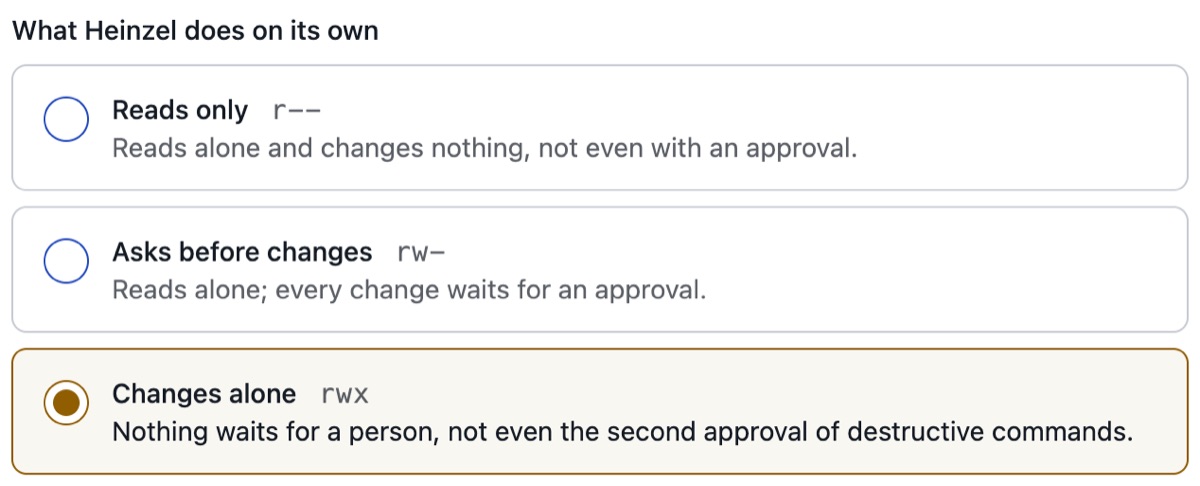
Per tenant, group, server and session you set whether Heinzel Pro only reads, asks before every change or works alone. Destructive commands can ask for a second person.
Rules check every command
The model only proposes commands. Before one runs, program code classifies it under an open rule set: read-only, write, package, service, firewall, reboot, destructive or blocked. Your rights per session decide which class runs on its own, which waits for your approval and which never runs. Whatever the code cannot read counts as write. You can read the rules and add your own per tenant and server.
Nothing leaves your network
From Business up, Heinzel Pro runs on-premises, on your own servers, with a model in your own network if you like. Passwords in an output are blacked out before the model sees them.
heinzel-pro.de
For every session you choose what Heinzel Pro may do on its own.
heinzel-pro.de
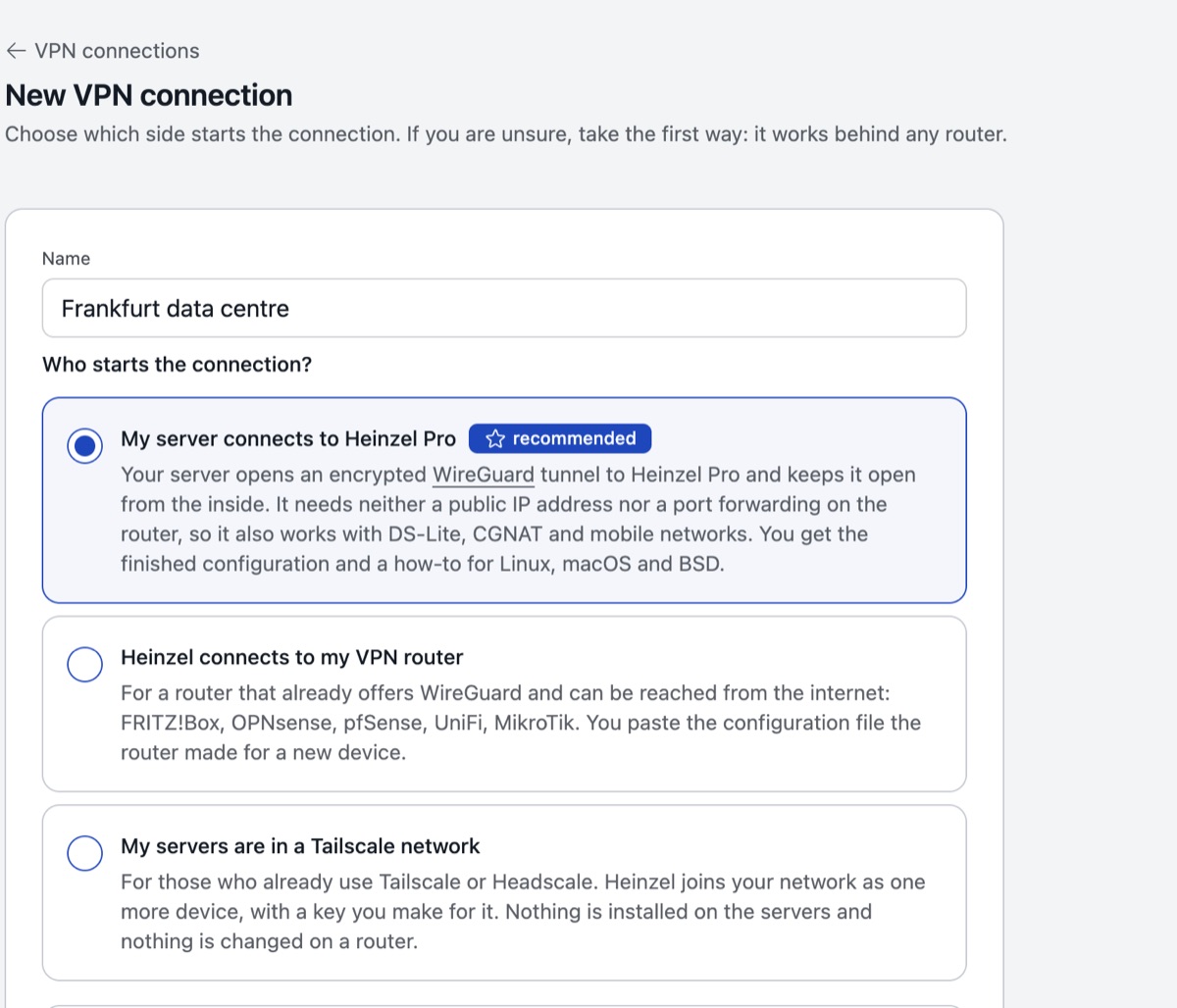
Usually Heinzel Pro connects straight over SSH. It reaches a server behind a router over a VPN connection, with WireGuard or Tailscale.
Every command is in the audit log, with its classification, its result and the name of whoever approved it. For ISO 27001, SOC 2
and BSI IT-Grundschutz
we show which control a feature can be mapped to.
Schedules
Heinzel Pro works to a plan, even while everybody sleeps
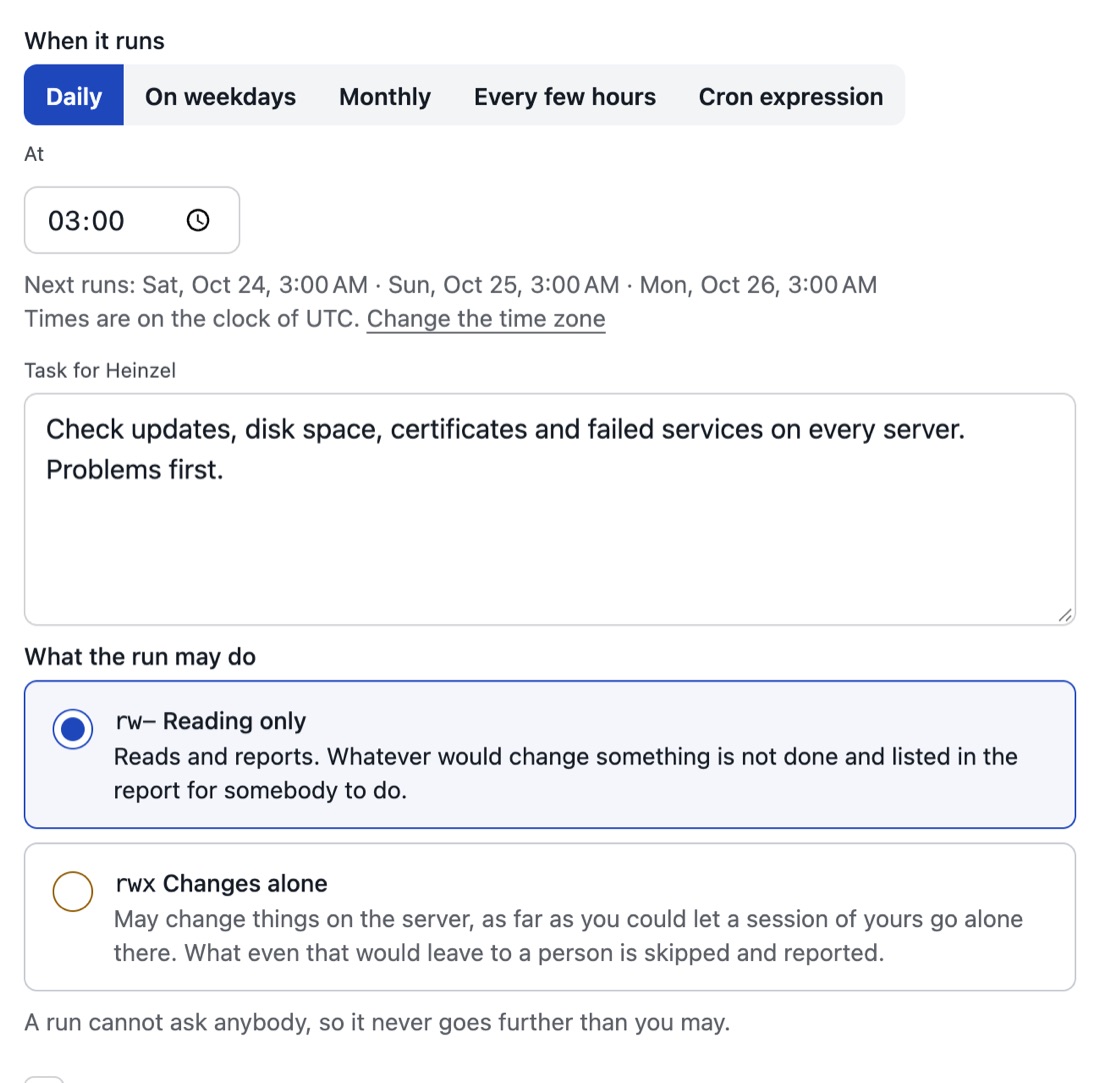
A schedule starts a job by itself: daily at 3 a.m., on weekdays, monthly, every few hours or as a cron expression. It runs on one server or a whole server group, and the report arrives by email.
With rw-
the run only reads and writes into the report what would need changing. With
rwx
it changes things itself, but never further than you may.
heinzel-pro.de
A schedule for every night at 3 a.m., reading only.
An example: the database moves while the website keeps running
The disk of the database server reports errors. Heinzel Pro sets up a standby server, copies the data while it keeps running and moves the IP address over. The web servers cannot write for 41 seconds.
Several admins work on the same server. A session announces what it changes and waits when it would get in a colleague's way.
You share sessions with colleagues, groups or by link, and every message carries its sender.
An overview shows where a person is needed today, and Heinzel Pro pings you as soon as a session needs you.
Approvals and limits
The four-eyes rule applies to destructive commands.
You have an emergency stop, a block list and standing approvals for exactly one command.
You approve the same command on many servers at once.
A test box shows how a command would be classified, without running it.
Ready for the auditor
The audit log is append-only, hash-chained and exports to CSV.
A second person countersigns sessions in which something ran alone.
An access review comes up each quarter, and every session serves as a change record.
The whole fleet
You import servers in bulk.
You see load, memory, temperature and disks of every server, live.
You see who is working on which server right now, on a terminal too.
The same job runs on many servers in parallel, and one schedule covers a whole group.
Models, keys, tenants
Several models run side by side, prescribed per team, server or group if you like.
SSH keys are made inside the application, rotated and never exported.
Tenants keep customers or departments strictly apart.
You sign in with passkeys, two-factor or single sign-on through OpenID Connect.
Reports when it matters
Reports of scheduled runs arrive by mail.
Alerts reach you by mail and webhook, and each week a mail sums up what was left undone.
A session reports when its job is done, by mail or into the team's channel.
Nobody notices an upgrade of Heinzel Pro, because a running command outlives the restart, and the rule set updates without one. Heinzel Pro works on a phone, has search across everything and a command palette on Ctrl+K, in German and English.
Customers
What customers say
“Server administration always gave me a rash, but thanks to Heinzel I can do plenty of jobs myself that I would otherwise have needed outside help for. A highly recommendable, time-saving solution, also for running software updates, backups and all, and keeping the server current.”
Prof. Dr. Frank J. Müller University of Bremen
“When I heard about php2shell, I was in the car on my way to a business appointment. At my customers I had a whole range of servers to secure: all sorts of PHP versions, some with Apache, some with Nginx, spread over Debian, Ubuntu and other Linux distributions. Normally that would have meant hours, if not days, of work. With Heinzel Pro a single prompt from my phone was enough: within 20 minutes the problem was fixed on every server, fully automatically.”
Each price is for one installation, and how many servers it looks after is in the plan. Free costs nothing and has an hour of working time a week; the other plans count no time. From Business up, Heinzel Pro also runs on-premises, in your data centre or your own cloud account. You change the plan at any time; up holds at once and is settled by the day.
In every plan: Claude Haiku 5.5 included, under fair use and as long as we offer it; stronger models with your own AI key (Anthropic, OpenAI-compatible or Ollama). No limit on the number of sessions; the figure says how many run at the same time.
All prices net, plus 19% VAT where it applies. In the cloud, you reach Heinzel Pro at heinzel-pro.de in your browser. For more than 100 seats or 600 servers we quote a price on request. A dedicated server with us, yours alone, from Business up on request.
Every session Heinzel is working on counts towards the sessions at a time, a rollout's or a schedule's too. So on Team a rollout over 20 servers runs on up to 2 servers at a time, and people's messages go first.
Consulting and training
cost €275 an hour, remote or on site; on site with at least 6 hours and the travel costs.
On-premises
Heinzel Pro on your own servers
From Business up, Heinzel Pro also runs in your data centre or your own cloud account. It is the same software as with us: one container and one PostgreSQL. Sessions, logs and credentials then live in your database.
Order
Create an account and pick "Run it on your own servers". The licence key is on the page at once; no tenant in our cloud comes with it.
Welcome
Install
A Linux host with Docker Compose. The guide leads to the first sign-in with every command ready to copy, in about an hour.
docker compose up -d
Paste the key
It is verified offline. Without a key the installation runs as a 14-day trial with 3 seats.
Installation, Settings, License
Let it run
Four times a day the installation fetches a renewed key, sending only the old one. An upgrade is one changed line.
HEINZEL_VERSION=4.5.0
Price
Business or Enterprise plus 20%, by the month or by the year.
AI model
Your key with Anthropic or an OpenAI-compatible provider, or a model in your own network. Then Heinzel Pro runs without the internet too.
Outbound
No telemetry, no usage figures. Connections go only to what you enter, plus the rule set and the key renewal. Both can be switched off.
When the licence ends
14 days of grace with a notice, then no new sessions start. Everything recorded stays readable.